
▼ In This Article
If you manage reservations for a park district, you already know the real problem isn’t a lack of interest in your facilities — it’s the chaos of turning that interest into a booked, paid, approved reservation without double-booking the pavilion or losing a permit in someone’s inbox. Facility reservation software exists to solve exactly that problem, but most articles about it are written for gyms and coworking spaces, not for the specific mess of running fields, shelters, courts, community rooms, and camps across a public agency with residents, budgets, and boards to answer to.
This guide is different. It walks through how park districts actually use facility reservation software — by facility type, by workflow, and by the public-sector requirements (accessibility, payment security, procurement, audit trails) that most vendor content skips entirely. Whether you’re comparing platforms for the first time or trying to justify replacing a shared calendar and a filing cabinet, you’ll find a complete evaluation framework here, along with a practical roadmap for rolling it out.
What Is Facility Reservation Software for Park Districts?
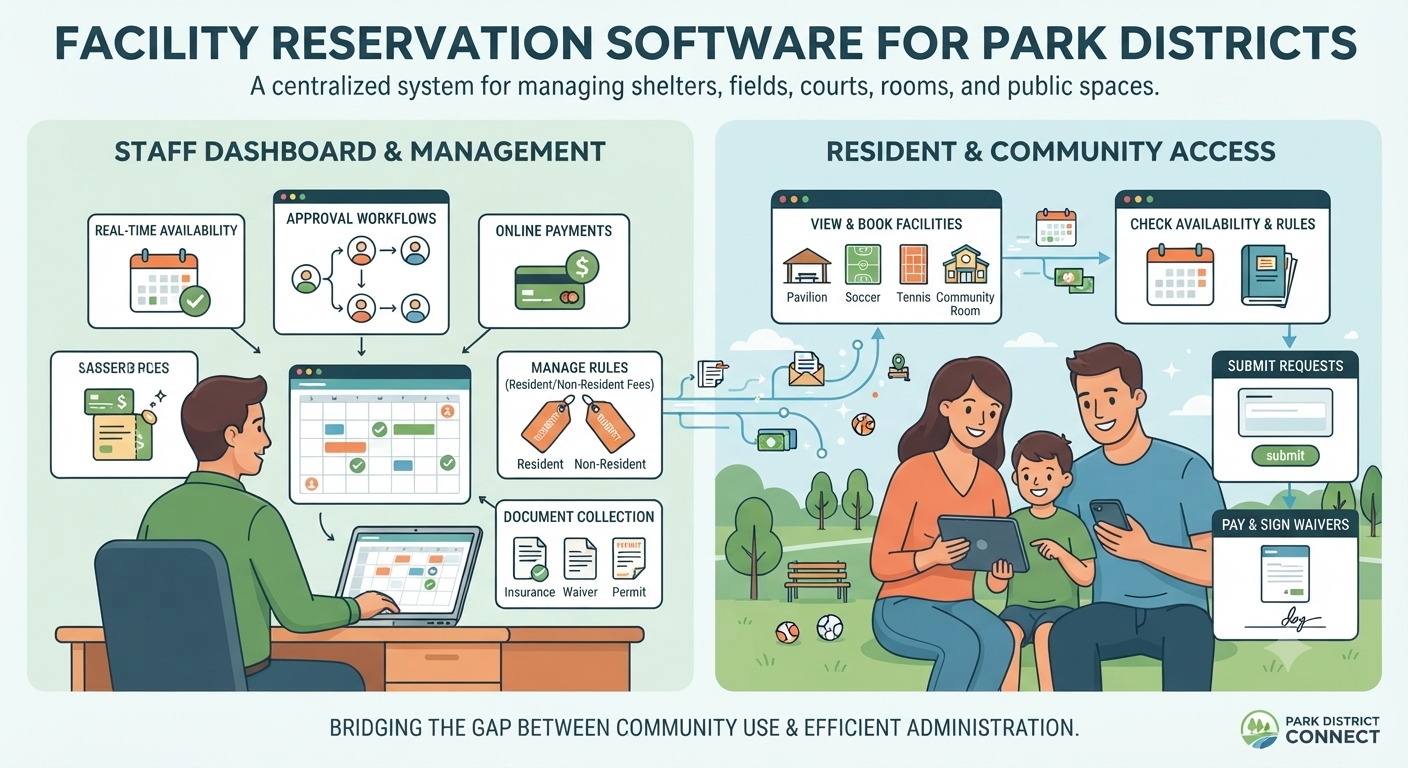
Facility reservation software for park districts is a system that lets residents and staff check real-time availability, submit or approve reservation requests, collect payments and required documents, and manage rules like resident pricing and blackout dates — all for a portfolio of shelters, fields, courts, rooms, and other public spaces.
It’s related to, but not the same as, generic room-booking tools or broader parks and recreation management software:
- Room booking software (like a scheduling assistant for a single conference room) doesn’t handle deposits, waivers, resident/non-resident fees, or multi-facility approval chains.
- Parks and recreation management software is a wider umbrella that often includes program registration, membership management, and point-of-sale — facility reservation is one module within it.
- Facility reservation software, specifically, is the layer that governs who can book what, when, under what rules, and with what proof (insurance, waivers, permits) attached.
For a park district, that distinction matters because your facilities aren’t interchangeable. A pavilion reservation and a season-long league field booking are different transactions with different risk levels, and your software needs to treat them that way.
Why Park District Facility Reservations Are Harder Than Standard Room Booking
A conference room has one calendar, one capacity, and one type of user. A park district has none of that consistency, which is exactly why generic booking tools break down fast.
Multiple facility types with different rules. Pavilions, ball fields, tennis and pickleball courts, community rooms, campsites, and multi-use event spaces each have their own capacity limits, setup requirements, and booking windows.
Seasonal demand spikes. Summer weekends can bring a flood of pavilion and field requests, while indoor rooms see steadier, year-round bookings tied to programs and meetings.
Resident vs. non-resident pricing. Most districts charge different rates (or apply different booking windows) to residents versus non-residents, which adds a pricing and eligibility layer that private venues rarely need.
Approvals, permits, deposits, and waivers. A simple room booking might be instant, but a large event with alcohol, vendors, or amplified sound often needs staff review, a certificate of insurance, a signed waiver, and a damage deposit before it’s confirmed.
Public accountability and reporting. Unlike a private venue, a park district answers to a board, a finance department, and the residents who fund it — which means every reservation, fee, and refund needs to be traceable and reportable.
Common Park District Reservation Workflows
Every park district runs several distinct reservation workflows at once. Software built for this environment needs to support all of them without forcing every request through the same rigid process.
Pavilion and Shelter Rentals
Typically a public-facing, self-service request: check availability, select a time block, pay a rental fee and deposit, and receive a confirmation. Larger gatherings may trigger an approval step for capacity, alcohol permits, or additional insurance.
Athletic Field and League Scheduling
Recurring, season-long bookings for youth and adult leagues, layered on top of ad hoc practice or tournament requests. This is where conflict detection matters most — a single missed overlap can cancel a game in front of fifty families.
Court Reservations
Shorter, higher-frequency bookings (tennis, pickleball, basketball) that benefit from simple self-service tools, booking windows, and fair-use limits so the same group can’t monopolize prime-time slots.
Community Rooms and Recreation Centers
Meetings, parties, and classes that often require a signed rental agreement, a security deposit, and sometimes a certificate of insurance, depending on the event type.
Camps, Classes, and Recurring Programs
Recurring internal bookings that need to be locked in well ahead of public reservation windows, so a room or field doesn’t get double-booked against a season-long program.
Festivals and Multi-Facility Events
The most complex workflow: one event that spans multiple facilities (a field, a pavilion, and parking, for example), each with its own approval chain, vendor coordination, and staffing plan.
Core Features to Look For in Facility Reservation Software
When you strip away the marketing language, most facility reservation platforms compete on the same set of core capabilities. Here’s what to prioritize:
- Real-time availability across every facility, visible to both staff and the public
- Conflict detection that blocks double-bookings automatically, rather than relying on staff to catch overlaps manually
- Public request forms so residents can submit reservations without calling or emailing
- Approval workflows that route high-risk or complex requests to staff while letting simple ones book instantly
- Recurring reservations for leagues, camps, and standing bookings
- Permit and waiver collection, ideally with document upload built into the request flow
- Payments, deposits, and refunds, including partial refunds for cancellations
- Resident/non-resident pricing rules applied automatically based on address or membership status
- Staff and resource scheduling for setup crews, equipment, and shared resources tied to a reservation
- Reporting and utilization analytics that show revenue, usage rates, and facility performance
- Mobile access for field staff checking in renters or approving requests on the go
- Accessibility and security, covering both public-facing accessibility standards and payment data protection
Manual Booking vs. Facility Reservation Software
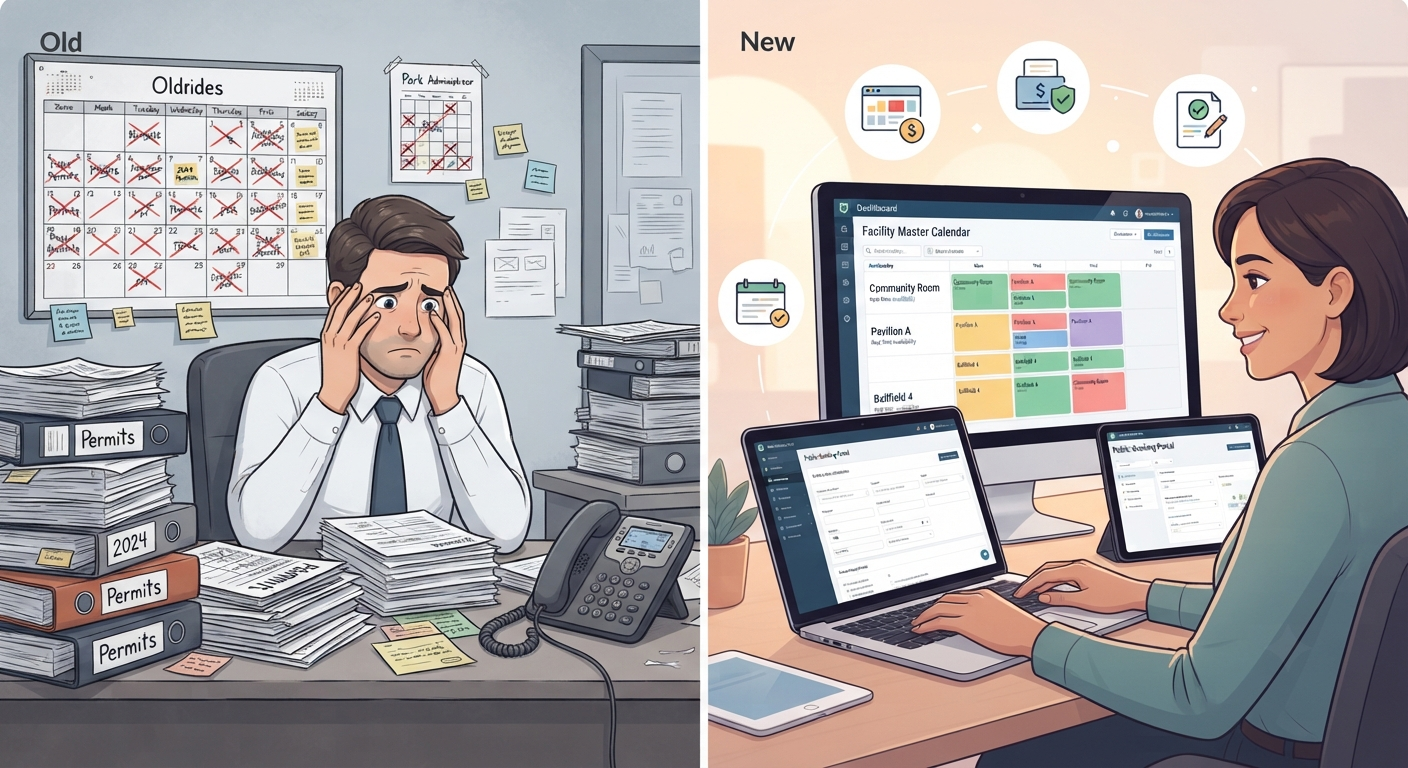
Most park districts don’t move to dedicated software because manual processes are impossible — they move because manual processes quietly cost hours of staff time and create risk that only shows up after something goes wrong.
| Task | Manual Process (Spreadsheets, Email, Phone) | Facility Reservation Software |
|---|---|---|
| Checking availability | Staff cross-reference multiple calendars or spreadsheets | Real-time availability visible instantly to staff and residents |
| Preventing double bookings | Relies on manual checking; errors happen during busy seasons | Automatic conflict detection blocks overlapping requests |
| Collecting payments | Checks, in-person payments, manual reconciliation | Online payments, deposits, and refunds processed automatically |
| Approvals | Emails, phone calls, or in-person sign-off with no clear audit trail | Structured approval workflows with a documented history |
| Resident vs. non-resident pricing | Manually applied by staff, prone to inconsistency | Automatically applied based on set rules |
| Waivers and permits | Paper forms or scanned attachments in email | Digital collection tied directly to the reservation record |
| Reporting | Manually compiled from multiple sources for board meetings | Exportable utilization and revenue reports on demand |
| Staff time per reservation | Higher — multiple touchpoints per booking | Lower — many requests are self-service from start to finish |
How to Evaluate Vendors
Once you’ve narrowed down what features matter, the evaluation process is where most park districts either save themselves a bad purchase or walk into one. A few questions worth asking before you sit through a single demo:
Questions to ask:
- How does the system handle resident vs. non-resident pricing out of the box?
- Can approval rules differ by facility type or event size?
- What happens to a reservation if a payment fails or a renter cancels?
- Can the platform generate reports formatted for a board or finance department, not just internal use?
- What’s included in onboarding, and what’s an added cost?
Demo checklist:
- Ask to see a real conflict-detection scenario, not just a static calendar view
- Request a walkthrough of the full request-to-confirmation flow, including document upload
- Confirm mobile functionality on an actual phone, not just a responsive desktop view
RFP criteria to include:
- Data security and payment processing certifications
- Accessibility compliance documentation
- Data migration support and timeline
- Customer support model and response times
- Contract terms, including renewal and data-export rights
Red flags:
- Vendors that can’t clearly explain how resident/non-resident pricing works
- No documented accessibility or payment security information
- Pushback on providing references from other public-sector or park district customers
Security and accessibility documentation to request: Under Title II of the ADA, the Department of Justice requires state and local government web content and mobile apps to generally meet WCAG 2.1 Level AA, with compliance deadlines of April 26, 2027 for larger jurisdictions (50,000+ population) and April 26, 2028 for smaller entities and special district governments. If your park district’s public reservation portal falls under this rule, ask vendors directly whether their platform meets WCAG 2.1 AA today, not just “on the roadmap.”
On the payment side, any platform that stores, processes, or transmits cardholder data — or that could affect the security of that data — falls under PCI DSS requirements. Ask vendors how payment processing is handled and whether they carry current PCI DSS compliance documentation.
Implementation Roadmap for Park Districts
A facility reservation rollout tends to go smoothly when it’s sequenced deliberately rather than switched on all at once.
- Facility inventory. Document every reservable space, its capacity, setup requirements, and any facility-specific rules.
- Rules and fees setup. Configure resident/non-resident pricing, deposits, cancellation policies, and blackout dates.
- Approval mapping. Decide which reservation types can be instant-booked and which require staff review, and assign approvers.
- Pilot facility. Launch with one facility type — often pavilions or community rooms — before rolling out district-wide.
- Staff training. Make sure both office staff and field staff (who may only need mobile check-in access) know their part of the workflow.
- Public launch. Communicate the new online booking option to residents through your website, newsletters, and signage at facilities.
- Reporting review. After the first season, review utilization and revenue reports to refine pricing, approval rules, and facility availability windows.
Where VenueArc Fits
VenueArc was built around the reality that public-sector venue teams manage a mix of facility types, approval requirements, and reporting obligations that most booking tools weren’t designed for. For park districts specifically, that means:
- One calendar covering parks, fields, rooms, and pavilions, so nothing gets double-booked across facility types
- Conflict prevention built into the reservation flow itself, not bolted on as an alert after the fact
- Reporting designed for board and finance audiences, not just internal dashboards
- Resource scheduling that ties staff, equipment, and setup needs to each confirmed reservation
- Public-sector-friendly workflows, including resident/non-resident pricing and structured approval chains for higher-risk reservations
If you’re comparing platforms, it’s worth looking at how VenueArc handles online booking and conflict prevention, how its reporting tools translate reservation data into board-ready summaries, how contracts and waivers are collected during the reservation process, and what security documentation is available for procurement review.
Common Challenges and How to Avoid Them
Challenge: Staff still field phone and email requests even after launching online booking. This usually means the self-service flow isn’t easy enough, or residents don’t know it exists. Promote the new process clearly and make sure the public request form covers the reservations people actually want most — pavilions and rooms first.
Challenge: Double bookings still happen during peak season. This is often a sign that a facility or resource (like a shared piece of equipment) isn’t fully represented in the system. Audit your facility inventory to make sure every bookable space and resource is tracked, not just the obvious ones.
Challenge: Approval delays frustrate residents. Set clear service-level expectations (for example, a 2-business-day review window) and route only genuinely complex requests through manual approval — let simple, low-risk reservations book instantly.
Challenge: Resident/non-resident pricing gets applied inconsistently. Automate the pricing rule based on address or registration status instead of relying on staff judgment at the point of sale.
Challenge: Reporting takes as long as it did before. If board or finance reports still require manual compilation, the reporting configuration likely needs adjustment — most modern platforms can generate these automatically once the underlying data is structured correctly.
Best Practices
- Build your facility inventory and pricing rules before you ever open public bookings — retrofitting rules after residents start reserving creates confusion and complaints.
- Keep instant-book available for low-risk, simple reservations, and reserve manual approval for higher-risk or high-capacity events.
- Require waivers and certificates of insurance digitally, at the point of booking, rather than chasing paperwork afterward.
- Review utilization reports at least quarterly to catch underused facilities or pricing that needs adjusting.
- Communicate blackout dates and maintenance closures inside the booking calendar itself, not through a separate announcement.
- Pilot with one facility type before a full rollout, so staff can troubleshoot the workflow on a smaller scale first.
Future Trends in Venue Management
Facility reservation software for park districts is following a few clear directions:
- Deeper integration with Microsoft 365 and similar productivity tools. Native room and equipment mailboxes in Outlook, along with Microsoft Bookings, already support basic internal scheduling — but as park districts push more of their public-facing reservation process online, expect dedicated facility software to integrate more tightly with these tools rather than compete with them outright.
- More automated compliance support. As accessibility deadlines under ADA Title II approach, expect vendors to build in more accessibility auditing and reporting directly into their platforms.
- Predictive utilization insights. Rather than just reporting what happened last season, platforms are moving toward forecasting demand spikes so staff can plan staffing and pricing ahead of time.
- Tighter payment security standards. As PCI DSS requirements evolve, expect more vendors to shift toward fully hosted, PCI-compliant payment processing rather than handling card data directly.
- Unified public portals. Residents increasingly expect one login and one interface to book a pavilion, register for a class, and reserve a court — pushing facility reservation and broader recreation management functionality closer together.
Microsoft 365 vs. Dedicated Facility Reservation Software
A question that comes up often: if a park district already uses Microsoft 365, can Outlook room mailboxes or Microsoft Bookings handle facility reservations instead of buying dedicated software?
Microsoft 365 room and equipment mailboxes let staff reserve shared internal resources through Outlook and the Scheduling Assistant, and Microsoft Bookings provides web-based booking pages integrated with Outlook for appointment-style scheduling. Both are useful for internal, staff-only scheduling — booking a conference room or an internal meeting slot, for example.
Where they fall short for park districts is everything beyond basic calendar-blocking: resident/non-resident pricing, deposits and refunds, waiver and insurance collection, tiered approval workflows, and board-ready reporting. If your reservation needs stop at “is this room free on Tuesday,” Microsoft 365 tools may be enough. If you’re managing public-facing bookings with payments, approvals, and compliance requirements, dedicated facility reservation software is built for that complexity in a way general productivity tools aren’t.
Key Takeaways Summary
- Park district reservations need facility-specific workflows, not generic room booking.
- Core features include conflict detection, approvals, resident pricing, payments, and reporting.
- Accessibility (WCAG 2.1 AA / ADA Title II) and PCI DSS compliance are real procurement factors, with 2027/2028 deadlines depending on jurisdiction size.
- A phased rollout (pilot facility first) is usually safer and faster than a full district-wide launch.
Compliance note before publication: ADA Title II compliance dates and PCI DSS framing should be verified against the latest ADA.gov and card-brand guidance before this goes live.
Bringing It All Together
Park district facility reservations are genuinely more complex than standard room booking — different facility types, resident pricing, approval chains, and public accountability all need to work together without creating extra work for staff or friction for residents. The districts that get the most value from facility reservation software are the ones that treat it as an operational shift, not just a new calendar tool: mapping out approval rules, preparing a clean facility inventory, and rolling out in phases rather than all at once.
If your team is still juggling spreadsheets, phone calls, and separate calendars for pavilions, fields, courts, and rooms, it’s worth evaluating what a purpose-built system could take off your plate — starting with the checklist and evaluation criteria in this guide.
See how VenueArc handles real-time availability, conflict prevention, and resident pricing for park districts — book a 30-minute workflow demo to walk through your specific facility mix.
Frequently asked questions
- What is facility reservation software for park districts?
It is software that manages facility availability, resident requests, approvals, pricing rules, payments, and reporting for pavilions, fields, courts, rooms, and other reservable public spaces.
What separates it from general scheduling tools is the public-sector requirements layered on top. Districts have to apply resident and non-resident rates consistently, accept payments securely, produce records that survive audit, and demonstrate that residents were treated equitably — none of which a calendar addresses.
The reporting requirement is often the one that forces the decision. Boards and councils ask which facilities are actually used, what rental income was generated, and whether a proposed capital project is justified. Those questions are answerable from a reservation system and effectively unanswerable from a spreadsheet that has been edited by a dozen people over five years.
- How does facility reservation software prevent double bookings?
It checks real-time availability across facilities and blocks overlapping requests based on configured rules, reducing conflicts during high-demand periods.
Configured rules matter as much as the availability check. A pavilion may be genuinely free between two reservations while still needing a gap for cleanup, and a field may be unbookable after heavy rain regardless of what the calendar shows. Encoding those rules prevents bookings that are valid on paper and impossible in practice.
The stakes are higher for districts than for private venues because the failure is public. Two groups arriving at the same shelter on a Saturday does not stay an internal administrative matter — it becomes a complaint to the district, and often to an elected board, from residents who paid for the space.
- Can park districts manage resident and non-resident pricing automatically?
Yes. Most dedicated systems let districts configure resident and non-resident rates, booking windows, and fee rules so pricing is applied consistently.
Booking windows are frequently as important as the rates themselves. Many districts give residents priority access for a period before opening reservations more widely, and enforcing that manually is difficult — particularly for popular facilities where the window opens and requests arrive immediately.
Consistency is the deeper benefit. When rates are applied by people rather than rules, differences creep in depending on who handled the booking, and those differences are hard to defend when a resident notices they paid more than someone else for the same pavilion. Configured pricing makes the fee schedule the actual behaviour rather than a document people are expected to remember.
- What compliance items should districts review during vendor selection?
Districts should review:
- Accessibility alignment, including WCAG 2.1 AA expectations for public-facing portals
- PCI DSS payment-security posture where payments are taken online
- Auditability requirements relevant to procurement and public accountability
These are worth raising early rather than late. Compliance questions are commonly deferred until the end of an evaluation, and districts discover only then that a preferred system cannot supply the documentation needed for approval — after months of effort.
Accessibility deserves particular attention because it applies to residents rather than staff. A reservation portal that cannot be used with a screen reader excludes people from a public service, which is both a compliance exposure and a straightforward equity problem regardless of what the law requires.
- What is the safest implementation approach for a district rollout?
A phased rollout is typically safest: start with one facility type as a pilot, validate workflows and reporting, then expand district-wide.
Choosing the right pilot matters more than the phasing itself. The instinct is to start with the simplest facility, but that tests very little. A moderately complex facility type — one with differential rates, an approval step, and real demand — surfaces the configuration questions you need answered before committing the whole district.
Validating reporting during the pilot is the step most often skipped. Districts confirm that bookings work, then discover months later that the reports a board expects cannot be produced from how the data was structured — a problem that is cheap to fix during a pilot and expensive afterwards.
- When is dedicated software better than basic calendar tools?
Dedicated software is generally better when districts need public-facing requests, payments, approvals, resident pricing, waiver collection, and board-ready reporting across multiple facilities.
Any one of those alone might not justify the change. A district with a handful of facilities, no online payments, and low demand can reasonably run on a shared calendar, and replacing something adequate adds cost without benefit.
The threshold is usually crossed on the public-facing side. Once residents expect to request and pay for a facility online rather than calling during office hours, a calendar cannot serve that need, and the workaround — staff manually transcribing requests from a web form into a calendar and chasing payment separately — costs more in time than the software it replaces.
Want technology done right?
Get a free assessment from an Inc. 5000 Microsoft Solutions Partner.
Get Free Assessment ->