
▼ In This Article
Managing Multi-Day, Multi-Space Events: A Guide for VBS Weeks, Tournament Weekends, and Festival Runs
A single event in one room on one day is manageable. A weeklong VBS across multiple classrooms, a tournament weekend rotating across fields, or a three-day festival with several zones is a different operational challenge.
These programs do not fail because teams do not care. They fail when complexity outgrows disconnected tools. If your organization is planning events like these, the goal is not just “get everything on a calendar.” The goal is maintaining control when plans inevitably shift.
Why Multi-Day, Multi-Space Events Get Complicated Fast
The risk is rarely one major mistake. It is the accumulation of small gaps:
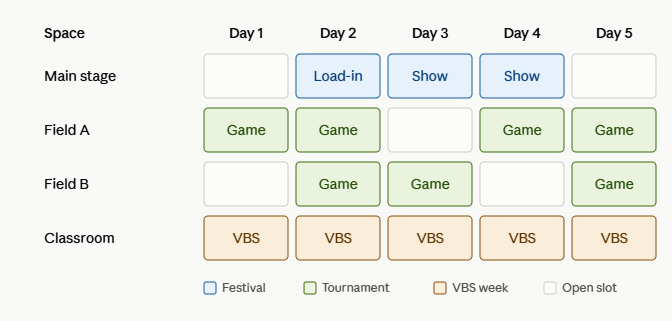
- Multiple spaces booked in parallel. A festival can require stage, classrooms, restrooms, food areas, and parking reservations at the same time.
- Shifting needs across days. Day 1 setup is not Day 3 setup, even when the event title is the same.
- Back-to-back bookings. Tournament schedules and ministry programs often run with very little turnaround time.
- Many stakeholders. Staff, volunteers, coaches, vendors, and partners all need clear and current information.
When those details live in different files, inboxes, or individual notes, conflict detection happens too late.
What Strong Multi-Space Event Management Looks Like
Whether you run church programs, park district tournaments, or community festivals, the same operating principles apply.
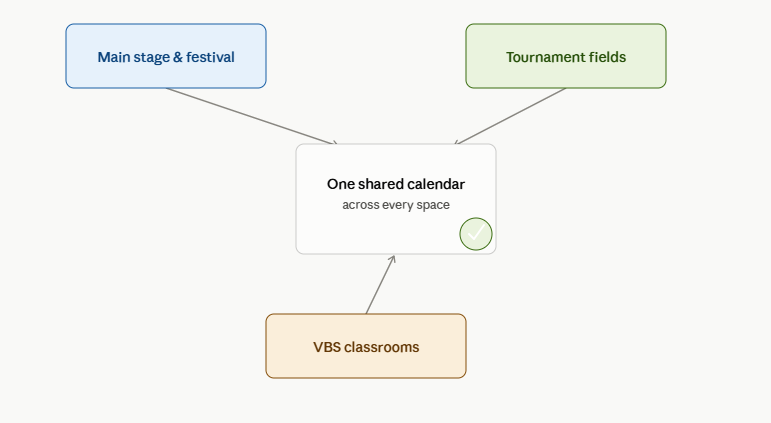
1. Use One Shared Calendar Across Every Space
Operations teams need one live view that shows all spaces and all days in the same context. This is where a structured multi-site and multi-campus church scheduling workflow is valuable even for teams starting with one location, because it enforces visibility and governance from the beginning.
2. Use Holds Before You Confirm
Complex events are often not decision-ready on day one. Sponsorship, staffing, or expected attendance may still be in motion. Holds let teams reserve a slot while decisions finalize, reducing rework and accidental overbooking.
If your team needs a deeper process model, this guide on performance holds, contracts, and event settlements explains how hold discipline reduces downstream operational and financial risk.
3. Build Repeatable Patterns Instead of Re-Entering Each Day
VBS week and tournament weekends are repeating structures with planned exceptions. Recurring patterns reduce manual work and prevent drift between day-by-day entries.
For facilities managing high public demand, this is also where recreation facility scheduling software helps by combining recurring patterns with clearer booking controls.
4. Keep Every Stakeholder on the Same Information
Rain delays, room changes, and timing shifts are normal. The failure point is not change itself. The failure point is when change reaches people unevenly.
A centralized operating model gives everyone the same source of truth, whether they are on-site or remote.
Multi-Space vs Multi-Site: Know Which Problem You Are Solving
- Multi-space: Coordinating many rooms or areas in one facility.
- Multi-site: Coordinating several facilities, campuses, or parks.
If your programs span more than one location, apply multi-site design early. Park and recreation teams can also compare facility reservation software for park districts when evaluating public-facing reservation complexity.
Practical Checklist for Your Next Multi-Day Program
- Map all spaces and dependencies before opening booking intake.
- Define hold, approval, and confirmation rules.
- Configure recurring structures with explicit exception handling.
- Assign owners for schedule updates and communication.
- Run a final conflict audit 48 hours before day one.
Related Reading for Church Operations Teams
If your context is ministry scheduling specifically, this church room and facility scheduling complete guide is a useful companion resource.
The Takeaway
Multi-day, multi-space programs do not have to create chaos. Teams that execute well are not always the teams with the smallest event load, they are the teams with the cleanest visibility and the clearest operating rules.
If you are coordinating events across multiple campuses or facilities, start with one connected framework for visibility, approvals, and recurring schedules. Explore multi-site and multi-campus church scheduling to bring the same clarity across your entire organization.
Frequently asked questions
- What makes multi-day events harder to manage than single-day events?
Multi-day events involve overlapping schedules, multiple spaces booked at once, back-to-back bookings with little buffer, and several stakeholders who all need visibility into changes — any one of which can cause a conflict if it isn't tracked centrally.
The compounding effect is what catches people out. A single-day event has one set of dependencies. A five-day event has five, plus the connections between them: what is left set up overnight, what has to be cleared before the next morning, and which spaces are unavailable because of what happened the day before.
Changes propagate too. Moving one session on day two can affect setup on day three and a room release on day four — relationships obvious to whoever planned it and invisible to everyone else.
- How do you schedule a recurring event like a VBS week or tournament weekend?
Instead of manually booking each day separately, use a scheduling system that supports recurring bookings — setting the event up once and applying it across each day of the program, which reduces manual entry and the risk of conflicts.
Manual entry is error-prone in a specific and predictable way: the days are similar but not identical. The first day needs extra setup time, the last needs teardown, and one afternoon uses a different room. Entered by hand, those differences are where mistakes appear.
The larger benefit is what happens when something changes. A recurring booking can be adjusted as a unit, so a shift in dates moves everything together — rather than leaving a handful of orphaned entries that quietly stay on the calendar and block spaces nobody is using.
- What's the difference between multi-space and multi-site event management?
Multi-space management means coordinating several rooms or areas within a single facility. Multi-site management means coordinating events and schedules across separate locations — different church campuses or park facilities, each with its own spaces and staff.
The distinction matters because the hard parts differ. Multi-space problems are physical: adjacent rooms, shared entrances, noise, and setup crews who cannot be in two places at once. Multi-site problems are organisational: different local practices, separate staff, and resources that travel between locations.
Confusing the two leads to poor tool choices. A system that handles one building well may have no concept of shared resources moving between sites, while a multi-site platform may model locations cleanly and handle the physical relationships inside a building poorly.
- Why use a hold instead of confirming a booking right away?
A hold reserves a space tentatively while other details — sponsorships, headcounts, or approvals — are finalized, without permanently blocking that space from other planning until the booking is confirmed.
The alternative is worse in both directions. Confirming immediately means the calendar fills with events that may never happen, and space is turned away for dates that later free up. Not recording anything means the space is genuinely at risk of being booked out from under an organiser who reasonably believed it was being held.
The discipline holds only if holds expire. A tentative reservation with no end date becomes a permanent block that nobody dares release, and venues that skip this end up with calendars showing far less availability than they actually have.
Want technology done right?
Get a free assessment from an Inc. 5000 Microsoft Solutions Partner.
Get Free Assessment ->