
▼ In This Article
Facility Reservation Software for Park Districts
If you manage a venue, you already know the real problem isn’t finding software with enough features. It’s trusting that the software you pick will actually hold up — that it won’t go down during your busiest booking week, that a staff member’s laptop getting stolen won’t mean a donor list ends up somewhere it shouldn’t, and that your team won’t spend half of every Monday re-entering the same event details into three different systems.
That’s the real question behind facility reservation software for park districts: not “what does it do,” but “what is it built on, and can I trust it?”
This article breaks down exactly why VenueArc runs on Microsoft Azure, what that means in plain English for the people actually running a venue, and how it stacks up against manual processes, generic scheduling tools, and on-premise systems. No jargon for jargon’s sake — just a clear look at the infrastructure decisions that quietly determine whether your venue software works when it matters most.
Why Azure Matters for Venue Management Software
Azure venue software simply means venue and event management software that is hosted and engineered on Microsoft Azure’s cloud infrastructure, rather than running on a single on-site server or a patchwork of local tools.
For venue teams, that distinction isn’t academic. It shows up in four places you feel every week:
- Security — who can see your renter contracts, donor data, and payment details, and how well that access is controlled
- Uptime — whether your booking calendar is reachable when a client calls during your busiest hour
- Integrations — whether your box office, finance, and operations tools actually talk to each other
- Reporting — whether leadership can see accurate, current numbers without someone manually stitching together three spreadsheets
VenueArc was built on Microsoft Azure because venue operations increasingly depend on connected, sensitive data — and spreadsheets, shared drives, and disconnected point tools were never designed to carry that load.
For teams focused on online booking and conflict prevention, infrastructure decisions here have direct day-to-day impact.
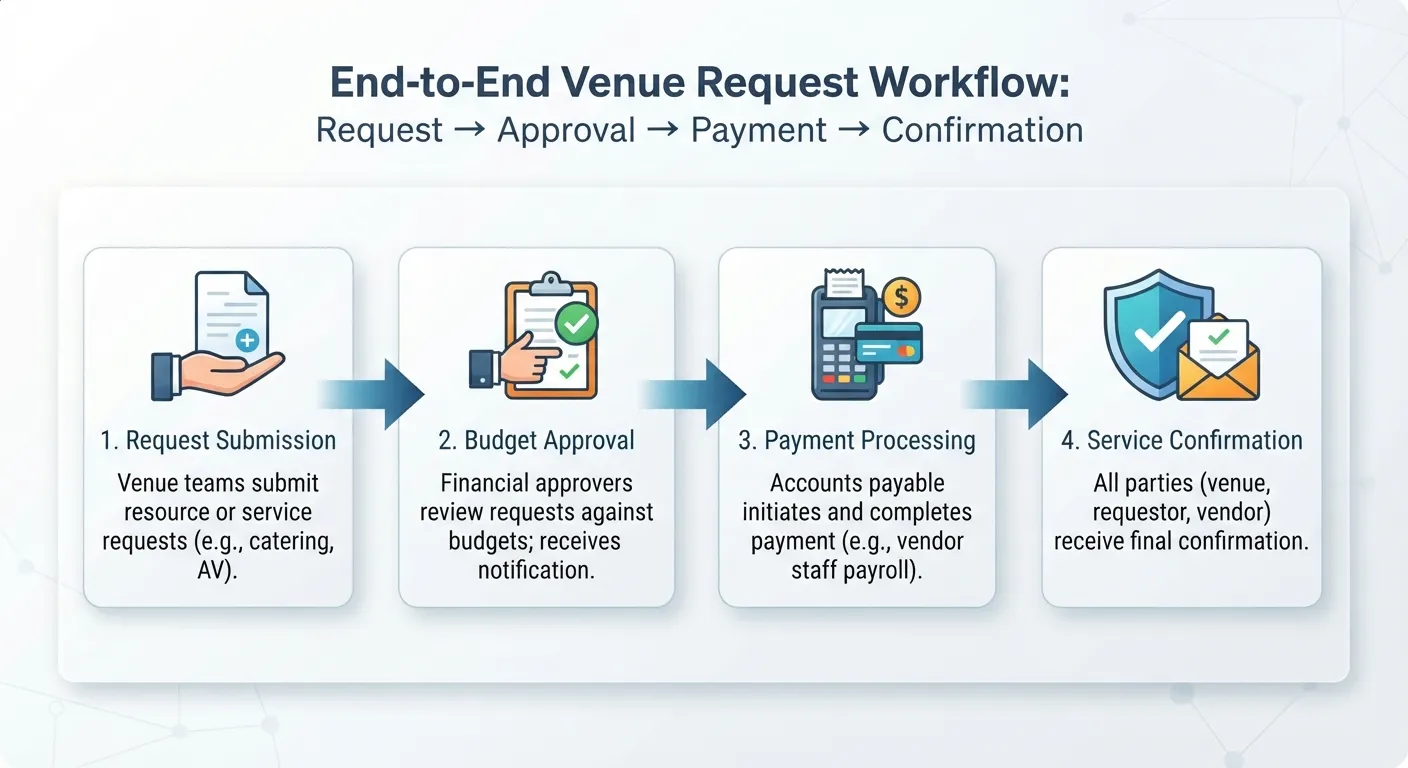
The Problem: Venue Operations Now Run on Sensitive, Connected Data
A single event at your venue touches a surprising amount of information: the inquiry, the hold on the calendar, the contract, the deposit, insurance certificates, vendor details, staffing assignments, day-of logistics, the final settlement, and the reporting that goes to your board or ownership group afterward.
When that information lives in disconnected places — a shared calendar here, a spreadsheet there, contracts in someone’s email — a few predictable problems show up:
- Double bookings because the “master calendar” isn’t actually the master calendar
- Lost or outdated contracts buried in someone’s inbox
- No single source of truth for what a client actually agreed to
- Manual re-entry of the same booking into finance, staffing, and reporting tools
- Limited visibility for leadership into utilization, revenue, or upcoming risk
- Real data exposure risk when sensitive files sit on personal laptops or unsecured shared drives
None of this is a people problem. It’s an infrastructure problem. And it’s exactly the gap that cloud-native, security-first architecture is designed to close.
How VenueArc Uses Microsoft Azure
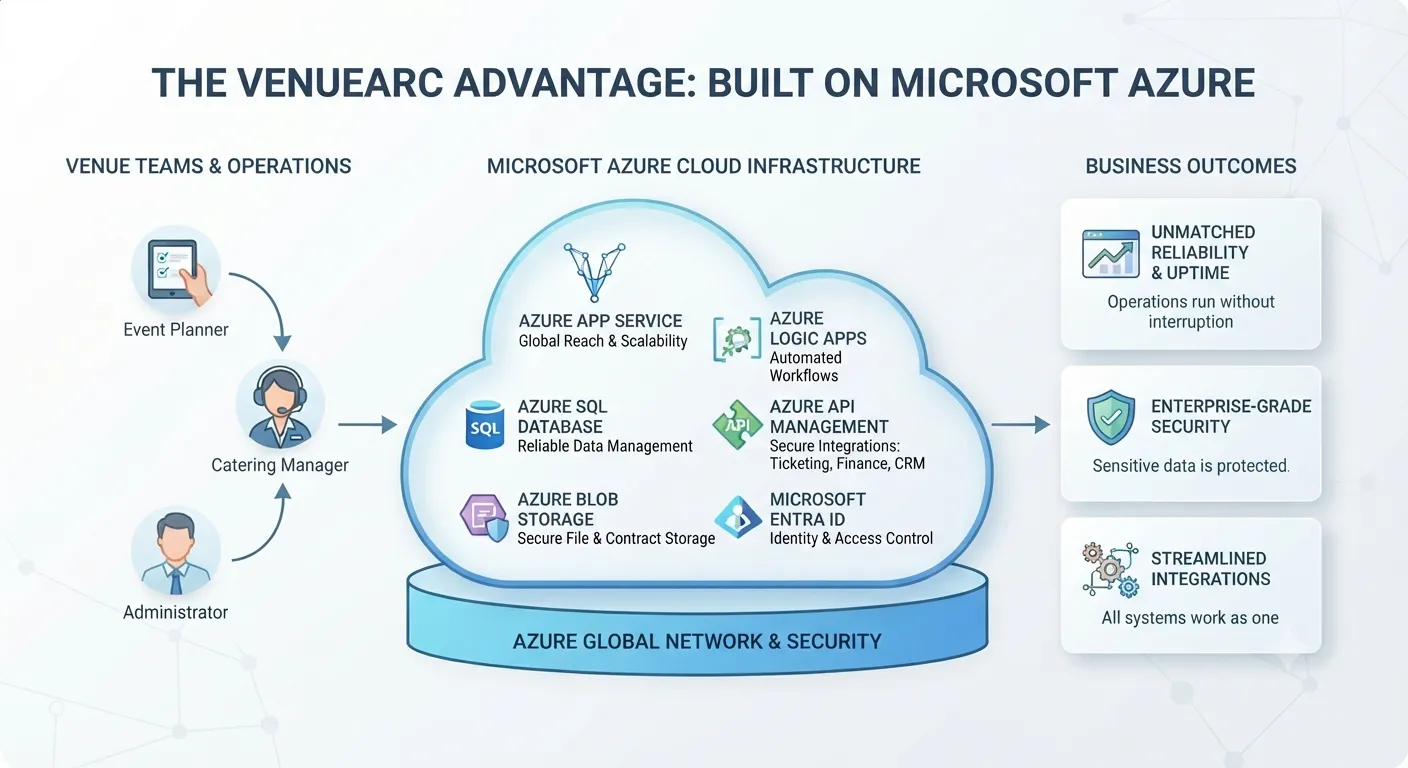
VenueArc’s platform is built directly on Azure’s application, data, and security services rather than a self-managed server stack. Here’s how the pieces map to what your team actually experiences day to day.
| Azure Service | What It Does | What It Means for Your Venue Team |
|---|---|---|
| Azure App Service | Hosts VenueArc’s web application and APIs without relying on a single physical server | Your team can access bookings, calendars, and client records from anywhere, with the platform able to scale up during peak booking seasons |
| Azure SQL Database | Manages VenueArc’s core operational data — bookings, contracts, client records | Your booking and client data is backed up and structured to avoid becoming a single point of failure |
| Azure Blob Storage | Stores unstructured files like contracts, insurance certificates, floor plans, and documents | Documents attached to a booking are stored securely and stay linked to the right event |
| Azure Logic Apps | Powers automated workflows and notifications across systems | Routine tasks — deposit reminders, approval routing, status updates — happen automatically instead of manually |
| Azure API Management | Manages and secures how outside systems connect to VenueArc | Integrations with ticketing, CRM, or finance tools happen through a controlled, secured gateway instead of a fragile custom connection |
| Microsoft Entra ID (Azure AD) | Handles identity, authentication, and access control | Staff log in with managed credentials, and access can be limited by role, location, or department |
The result isn’t just “VenueArc is in the cloud.” It’s that each layer of the platform — hosting, data, documents, workflows, integrations, and identity — is built on infrastructure Microsoft engineers, secures, and continually updates, so VenueArc’s team can focus on venue-specific functionality instead of reinventing baseline infrastructure.
Security and Governance Built for Venue Teams
Venues handle information that deserves real protection: renter contracts, donor and patron records, payment details, insurance documents, and internal financial data. A house of worship’s giving records or a theatre’s donor database are not lower-stakes than a corporate dataset — they just get less attention.
Azure’s identity and data services give VenueArc a foundation to build practical safeguards around that information:
- Role-based access control (RBAC) — staff and volunteers only see what their role requires, not the entire system
- Managed authentication through Microsoft Entra ID, instead of shared logins or generic passwords
- Encrypted data storage and transfer, using Azure’s built-in data protection capabilities
- Audit trails that show who accessed or changed a booking, contract, or client record
- Structured backup processes for operational data, reducing the risk of a single point of failure
- Multi-site permission structures, so a multi-location operator can separate access by venue or region
This isn’t about chasing every possible certification badge. It’s about giving venue operators — many of whom don’t have a dedicated IT security team — a platform where the hard security work is handled by infrastructure built for it, rather than left to whoever happens to manage the office laptop.
Reliability, Scalability, and Continuity
Ask any venue manager what “downtime” costs them, and you’ll get a specific, frustrated answer: a client who couldn’t confirm a hold, a staff member locked out of the day-of schedule, a board member who couldn’t pull a report before a meeting.
Azure’s infrastructure is designed around redundancy and elastic capacity — meaning the underlying platform doesn’t depend on one server staying online, and it can flex as usage grows.
In plain English, that means:
- Your booking system isn’t tied to a single point of failure sitting in a back office
- VenueArc can handle usage spikes — like your busiest booking week of the year — without everything grinding to a halt
- As you add venues, staff, or event volume, the platform scales with you instead of requiring a costly infrastructure overhaul
- Data redundancy reduces the risk that a hardware failure means lost bookings or lost history
For a single-site community theatre, this mostly shows up as “the system just works.” For a multi-location park district or a growing multi-site venue group, it’s the difference between software that scales with your organization and software you outgrow in two years.
Integrations: Connecting Front-of-House and Back-Office Systems
Most venues don’t run on one system — they run on several, and the gap between them is where time and accuracy get lost. Azure API Management gives VenueArc a secure, structured way to connect with the tools your team already relies on, instead of fragile one-off integrations that break every time something updates.
Common integration points include:
- Ticketing platforms (such as Ticketmaster) for events with public ticket sales
- Arts and culture CRM systems (such as Tessitura) for performing arts organizations tracking patrons and donors
- Microsoft 365 — email, calendar sync, and document collaboration your staff already uses daily
- Payment processors for deposits, invoicing, and settlements
- Webhooks and open APIs for organizations that need custom connections to finance or reporting tools
The practical benefit isn’t “more integrations” as a checkbox. It’s that your box office, finance team, and operations staff can work from consistent, current data instead of manually reconciling three systems after the fact.
If your workflow includes approvals, permits, and renter documentation, evaluate whether the platform handles contracts and waivers in the same system as the booking record.
Analytics and Reporting on a Stronger Data Foundation
Reporting is only as good as the data underneath it. When bookings, contracts, and settlements live in one connected system rather than scattered spreadsheets, reporting stops being a monthly scramble and starts being something leadership can actually rely on.
With centralized, structured data, venue teams can get clearer visibility into:
- Space utilization — which rooms, stages, or facilities are booked, and which are underused
- Revenue trends across event types, seasons, or client segments
- Settlement accuracy — matching what was billed against what was collected
- Client and renter history, useful for both sales follow-up and donor stewardship
- Operational bottlenecks, like recurring scheduling conflicts or staffing gaps
This matters just as much for a nonprofit board reviewing quarterly numbers as it does for a multi-site operator comparing performance across locations.
Teams comparing vendors should also review built-in reporting tools against their board and finance requirements.
Cloud vs. On-Premise Venue Software
For teams still deciding between cloud and on-premise systems, the trade-offs are worth laying out plainly.
| Factor | On-Premise Software | Cloud (Azure-Based) Software |
|---|---|---|
| IT burden | Your team manages servers, updates, and patches | The cloud provider manages infrastructure and patching |
| Security patching | Manual, often delayed | Continuous, handled at the platform level |
| Remote access | Limited or requires VPN setup | Built-in — accessible from anywhere with login credentials |
| Scalability | Requires new hardware to grow | Scales through the cloud provider’s infrastructure |
| Upfront cost | Higher (servers, IT setup) | Lower (subscription-based) |
| Disaster recovery | Dependent on local backups | Built into cloud data architecture |
| Multi-site support | Difficult without added infrastructure | Native — one platform across locations |
Neither model is “wrong” in every scenario, but for most venue operators — especially those without a dedicated IT department — the ongoing maintenance burden of on-premise systems tends to outweigh the upfront simplicity.
Manual Processes vs. Venue Management Software
It’s also worth comparing where most venues start: manual, spreadsheet-and-email-based coordination.
| Task | Manual Process | Venue Management Software |
|---|---|---|
| Booking a space | Shared calendar, email confirmation | Real-time availability with automated holds |
| Contracts | Drafted and tracked individually | Templated, stored, and linked to the booking |
| Deposits and payments | Tracked in spreadsheets | Logged and reconciled within the system |
| Client communication | Scattered across email threads | Centralized history tied to each client record |
| Reporting | Manually compiled before meetings | Generated from live, connected data |
| Multi-staff coordination | Prone to double-booking and miscommunication | Shared visibility across the whole team |
Practical Examples by Venue Type
Azure-native infrastructure isn’t an abstract benefit — it plays out differently depending on what kind of venue you run.
Churches and houses of worship Giving records, volunteer schedules, and facility bookings for weddings, funerals, and community events all involve sensitive, personal data. Role-based access means a facilities volunteer doesn’t need visibility into giving history to manage a room booking.
Community theatres Between rehearsal schedules, ticketing, donor relationships, and rental income from outside groups, a small staff is often juggling several data sources at once. Centralized booking and reporting reduce the coordination load on a lean team.
Performing arts centers With multiple resident companies, touring shows, and box office integrations, reliable uptime and integration with systems like Tessitura matter more than almost any other feature.
Park districts and recreation centers High booking volume across many facilities — fields, gyms, community rooms — makes scalability and multi-site permission structures essential, especially during peak seasons.
Event venues Fast-moving inquiry-to-contract cycles, deposit tracking, and vendor coordination benefit from automated workflows that don’t rely on someone remembering to send a follow-up email.
Multi-site venue operators Consistent reporting and permission structures across locations let leadership compare performance and utilization without needing a different system for every site.
Common Challenges and How to Avoid Them
Even with strong infrastructure underneath it, moving to a connected venue management platform comes with real challenges. Here’s what tends to trip teams up — and how to avoid it.
Challenge: Underestimating the migration effort Moving years of bookings, contracts, and client history out of spreadsheets takes planning. Avoid it by mapping your existing data sources before migration and setting a realistic timeline rather than a rushed cutover.
Challenge: Inconsistent staff adoption If only part of the team uses the new system, you end up maintaining two sources of truth. Avoid it by setting a firm cutover date and removing access to the old process once training is complete.
Challenge: Overlooking permission structure Giving everyone full access “to keep things simple” recreates the security gaps you were trying to fix. Avoid it by defining roles and access levels before go-live, not after an incident.
Challenge: Treating integrations as optional Skipping integration setup often means staff manually re-entering data anyway — losing much of the platform’s value. Avoid it by prioritizing your one or two highest-impact integrations (finance or ticketing) early, rather than all at once.
Challenge: Assuming “cloud” is a single feature to check off Not all cloud software is architected the same way — some vendors bolt cloud access onto legacy systems. Avoid it by asking vendors specifically what their infrastructure is built on and how data is backed up, not just whether it’s “cloud-based.”
Best Practices
- Start with a data and process audit. Know exactly where your bookings, contracts, and client data currently live before you migrate anything.
- Set role-based permissions deliberately. Define access by job function, not convenience.
- Prioritize your highest-friction integration first. Usually finance or ticketing — wherever manual re-entry currently costs the most time.
- Train staff on the “why,” not just the “how.” Adoption improves when teams understand what problem the system solves for them.
- Review reporting needs with leadership up front. Build dashboards around the numbers your board or ownership group actually asks for.
- Revisit permissions and integrations annually. As staff and vendors change, access and connections should be reviewed, not left on autopilot.
Future Trends in Venue Management
Venue operations are shifting in a few consistent directions, and infrastructure choices made now shape how easily an organization can adapt later.
- Deeper Microsoft ecosystem integration — venues already using Microsoft 365, Teams, and SharePoint increasingly expect their venue software to connect natively rather than sit apart from it
- Automation of routine workflows — deposit reminders, approval chains, and status updates moving from manual follow-up to automated triggers
- Centralized, real-time reporting replacing end-of-month or end-of-quarter manual compilation
- Greater scrutiny of vendor security practices — buyers are asking more specific infrastructure questions rather than accepting “we’re cloud-based” at face value
- Multi-site standardization — larger operators consolidating multiple venues onto a single platform instead of maintaining separate systems per location
Venues that choose infrastructure built for this direction now avoid a harder migration later.
Buyer Checklist: Questions to Ask About Cloud Venue Software
Before choosing any venue management platform, it’s worth asking vendors directly:
- What cloud infrastructure is the platform actually built on?
- How is data backed up, and how often?
- Who owns the data, and can we export it if we leave?
- Does the platform support role-based access and single sign-on?
- How are integrations secured — through a managed API layer or custom connections?
- What happens during a regional outage or infrastructure failure?
- How does the platform scale if we add venues or event volume?
- What does implementation and migration actually involve?
If a vendor can’t answer these clearly, that’s worth treating as a signal in itself.
Cloud vs. Basic Scheduling Tools
It’s also worth distinguishing venue management software from general-purpose scheduling tools, since they’re often compared during evaluation.
| Capability | Basic Scheduling Tool | Dedicated Venue Management Software |
|---|---|---|
| Room/space-specific booking rules | Limited | Built-in |
| Contract and document management | Not included | Integrated |
| Deposit and settlement tracking | Not included | Integrated |
| Client/renter history | Minimal | Centralized |
| Role-based permissions | Basic | Granular, by function or site |
| Reporting on venue-specific metrics | Not designed for this | Built-in |
| Multi-site support | Rare | Native |
General scheduling tools work fine for simple calendars. They tend to fall short once contracts, deposits, and multi-site operations enter the picture — which is where dedicated venue platforms are built to hold up.
Conclusion
The features on a venue software comparison chart matter, but they only matter if the platform underneath them is secure, reliable, and built to scale. That’s the real case for azure venue software: it’s not a marketing label, it’s an infrastructure decision that determines whether your booking calendar stays up during your busiest week, whether your renter contracts are actually protected, and whether your team spends time on venue operations instead of fighting disconnected systems.
VenueArc was built on Microsoft Azure specifically because venue operations — across churches, theatres, performing arts centers, park districts, and multi-site operators — have outgrown spreadsheets and disconnected tools. Azure’s application hosting, data management, security, and integration services give VenueArc a foundation that scales with an organization rather than becoming another system to maintain.
If you’re evaluating your current venue management process, the infrastructure question is worth asking before the feature-list question. You can review how VenueArc approaches cloud vs. on-premise venue software in more depth, or see the platform’s approach to security directly.
Book a park district workflow demo: book a 30-minute workflow demo
Download the reservation software evaluation checklist: Download the reservation software evaluation checklist
Frequently Asked Questions
What is Azure venue software?
Azure venue software is venue and event management software built or hosted on Microsoft Azure, giving it cloud-based security, reliability, integrations, and scalability rather than running on a single local server.
The distinction is not academic for a facility team. It shows up in who can see renter contracts and payment details, whether the booking calendar is reachable when a client calls during a busy hour, whether the box office and finance tools actually exchange data, and whether leadership can pull current numbers without stitching spreadsheets together.
The alternative - a self-managed server in a back office, or a patchwork of local tools - puts all of that maintenance on whoever happens to handle IT. Cloud-native architecture shifts the baseline infrastructure work to the platform provider instead.
Why is VenueArc built on Microsoft Azure?
VenueArc uses Azure so venue teams get secure identity management, reliable data storage, automated workflows, and scalable hosting without needing their own IT infrastructure to manage it.
Venue operations increasingly run on connected, sensitive data. A single event can touch an inquiry, a calendar hold, a contract, a deposit, insurance certificates, vendor details, staffing assignments, and a final settlement. Spreadsheets, shared drives, and disconnected point tools were never designed to carry that load safely.
Building on Azure means the hosting, database, document storage, workflow, integration, and identity layers all sit on infrastructure Microsoft engineers and updates. That lets VenueArc focus on venue-specific functionality rather than rebuilding baseline infrastructure that already exists.
Is VenueArc hosted on Microsoft Azure?
Yes. VenueArc's application, database, document storage, workflow automation, and identity management all run on Azure services.
- Azure App Service hosts the web application and APIs
- Azure SQL Database manages core operational data such as bookings, contracts, and client records
- Azure Blob Storage holds documents like contracts, insurance certificates, and floor plans
- Azure Logic Apps powers automated workflows and notifications
- Azure API Management secures how outside systems connect
- Microsoft Entra ID handles identity, authentication, and access control
The point is not that the platform is in the cloud generally, but that each layer - hosting, data, documents, workflows, integrations, and identity - runs on managed services rather than a single server someone has to maintain.
How does Azure improve venue software security?
Azure provides the underlying identity management, encryption, and access control tools that VenueArc uses to enforce role-based permissions and protect sensitive booking, contract, and client data.
Venues hold information that deserves real protection: renter contracts, donor and patron records, payment details, insurance documents, and internal financial data. A house of worship's giving records or a theatre's donor database are not lower-stakes than a corporate dataset, they just tend to get less attention.
In practice that foundation supports role-based access control, managed authentication instead of shared logins, encrypted storage and transfer, audit trails showing who changed a booking or contract, structured backup processes, and multi-site permission structures. For teams without a dedicated IT security function, having those controls built in matters more than any single feature.
Does VenueArc support role-based access control?
Yes. Access can be limited by staff role, department, or venue location, so team members only see what's relevant to their job.
The common shortcut is giving everyone full access to keep things simple, which quietly recreates the exposure the system was meant to reduce. A facilities volunteer coordinating a room booking has no reason to see giving history or donor records, and a part-time box office staffer does not need contract terms.
For multi-site operators the same mechanism separates access by venue or region, so a location manager works within their own site while leadership sees across all of them. Defining these roles before go-live is far easier than reworking permissions after an incident.
Does VenueArc support single sign-on?
VenueArc's identity management is built on Microsoft Entra ID (Azure AD), which supports managed authentication for staff logins.
That matters because the weakest point in most venue systems is not the software, it is credential handling - shared accounts, generic passwords, or logins that stay active after someone leaves. Managed authentication moves that control into a system built to handle it rather than a spreadsheet of passwords.
If single sign-on against your organization's existing directory is a firm requirement, confirm the specifics for your environment with the VenueArc team rather than assuming. Identity requirements vary by organization, and it is worth settling during evaluation rather than after implementation begins.
Where is VenueArc data stored?
VenueArc's operational data is stored in Azure SQL Database, with documents and files stored in Azure Blob Storage.
Splitting the two is deliberate. Structured records - bookings, contracts, client details - belong in a database that can enforce relationships and support reporting. Unstructured files like signed agreements, insurance certificates, and floor plans belong in object storage, where they stay attached to the right event instead of living in someone's inbox or on a personal laptop.
The practical result is that a booking record and its supporting documents travel together, and both sit inside managed Azure services rather than a local file share. If data residency is a requirement for your organization, confirm the specifics with the vendor during evaluation.
Does VenueArc integrate with Ticketmaster or Tessitura?
VenueArc supports integrations with ticketing and arts/culture CRM platforms, including Ticketmaster and Tessitura, through a secured API layer.
Routing integrations through Azure API Management rather than one-off custom connections is the part that matters operationally. Fragile point-to-point connections tend to break whenever either side updates, and the failure is usually discovered by a staff member re-entering data by hand.
The benefit is not a longer integration list. It is that the box office, finance team, and operations staff work from consistent, current data instead of reconciling three systems after the fact. Scope and configuration vary by organization, so confirm what a specific integration covers during evaluation.
Can VenueArc integrate with Microsoft 365?
Yes, VenueArc is built with Microsoft ecosystem compatibility in mind, supporting connections to tools venue teams already use like Microsoft 365.
For most teams that means the tools already open on every desk - email, calendar, and document collaboration - rather than a separate environment staff have to remember to check. Adoption tends to follow whichever system fits existing habits.
It also reflects where venue operations are heading. Organizations already standardized on Microsoft 365, Teams, and SharePoint increasingly expect venue software to connect natively rather than sit apart from it. As with any integration, confirm the specific connection points and configuration you need during evaluation.
Is cloud venue software safer than on-premise software?
Cloud venue software built on major providers like Azure typically benefits from continuous security patching, managed identity tools, and redundant data storage - protections that are difficult and costly for most venues to maintain on their own on-premise servers.
The gap is usually maintenance rather than design. On-premise systems can be secured well, but doing so requires someone to apply patches promptly, test backups, manage credentials, and monitor access. In venues without dedicated IT staff, that work tends to slip behind more urgent operational demands.
That said, not all cloud software is architected the same way, and some vendors add cloud access to legacy systems. Ask specifically what the platform is built on and how data is backed up rather than accepting cloud-based as an answer on its own. Security stays shared between vendor and customer either way.
How does VenueArc scale for multiple venues or locations?
Because VenueArc runs on Azure's cloud infrastructure, it can support additional venues, users, and event volume without requiring new on-site hardware.
Scaling is where locally hosted systems tend to show their limits. Adding a site means procuring hardware, extending the network, and duplicating maintenance, which is why many multi-location operators end up running a separate system per venue and losing any consistent view across them.
On a cloud platform the same instance covers additional sites, with multi-site permission structures separating access by venue or region. For a single-site theatre this mostly shows up as the system simply working. For a growing park district or multi-site group, it is the difference between software that scales and software you outgrow.
What is the difference between venue management software and event management software?
Venue management software focuses on managing physical spaces - bookings, contracts, facility scheduling, and settlements - while event management software often focuses more broadly on planning individual events, including agendas and attendee logistics. Many platforms, including VenueArc, cover both.
The distinction shows up in what each is optimized for. A venue platform is organized around the space and its calendar over time: what is held, what is confirmed, what was agreed to, and what was collected. An event platform is organized around a single event and the people attending it.
For an operator whose main problem is conflict-free scheduling across many rooms plus a documented trail from inquiry to settlement, the venue-side capabilities generally matter more during evaluation.
What is the difference between cloud and on-premise venue software?
Cloud venue software is hosted and maintained by the provider's infrastructure, with lower IT burden and built-in scalability. On-premise software requires the venue to manage its own servers, security patching, and backups.
The practical trade-offs tend to land like this:
- IT burden - handled by the provider versus managed by your own team
- Security patching - continuous at the platform level versus manual and often delayed
- Remote access - built in versus limited or requiring VPN setup
- Scalability - through the provider's infrastructure versus new hardware
- Upfront cost - subscription-based versus servers and IT setup
- Disaster recovery - built into cloud data architecture versus dependent on local backups
Neither model is wrong in every scenario, but for operators without a dedicated IT department the ongoing maintenance load of on-premise systems tends to outweigh the upfront simplicity.
How difficult is it to migrate from legacy venue software or spreadsheets?
Migration difficulty depends on how much historical data needs to move and how many disconnected systems are currently in use. A structured data audit before migration significantly reduces friction.
Most of the effort is not technical. It is deciding what actually needs to move: active bookings almost always, recent history usually, and years of archived records often only in summary form. Teams that skip that step tend to migrate everything at once and spend the transition cleaning up duplicates and inconsistent naming instead of verifying live reservations.
The other common failure is partial adoption. If only part of the team moves over, the organization ends up maintaining two sources of truth. Setting a firm cutover date and retiring the old process once training is complete avoids that.
Want technology done right?
Get a free assessment from an Inc. 5000 Microsoft Solutions Partner.
Get Free Assessment ->