
▼ In This Article
Recreation Facility Scheduling Software: Transparent, Affordable, and Built for Real Facility Operations
A park district running six community centers, a dozen ball fields, and a rotating calendar of youth camps, adult leagues, and pavilion rentals does not have a small scheduling problem. It has a genuinely complex operation, usually run by a team that is stretched thin and a budget that is watched closely. When that operation is still running on a shared calendar, a spreadsheet, and a lot of email back-and-forth, double bookings and lost requests are not a matter of if, but when.
That is the gap recreation facility scheduling software is built to close, giving recreation centers, park districts, and community facility teams one system for real-time availability, conflict prevention, recurring bookings, and resident self-service instead of a patchwork of manual processes. This guide walks through what the category actually includes, what transparent and affordable should really mean when you are comparing vendors, the features worth prioritizing, and a straightforward path for evaluating and implementing a new system without hidden surprises.
What Is Recreation Facility Scheduling Software?
Recreation facility scheduling software helps recreation centers, park districts, and community organizations manage the booking, availability, and conflict-free scheduling of shared physical spaces, gyms, pavilions, sports fields, courts, and community rooms, along with the resources and staff needed to run programs in them.
Scheduling Software vs. Recreation Management Software vs. Facility Booking Software
These terms get used almost interchangeably, but it is worth separating them:
- Facility scheduling or booking software focuses narrowly on reserving spaces: availability, conflicts, and approvals.
- Recreation management software is broader, covering program registration, memberships, payments, resident communication, and often facility scheduling as one module among several.
- Parks and recreation software is the widest umbrella, sometimes including asset or maintenance management, GIS, and citizen engagement tools on top of scheduling and registration.
Most recreation teams searching for scheduling software are really trying to solve the facility-booking piece first. This guide focuses there, while noting where broader recreation management platforms fit in.
When Microsoft Bookings or Google Calendar Is Enough and When It Is Not
Microsoft Bookings handles appointment-style scheduling with Outlook and Teams integration, booking pages, and reminders, which is genuinely useful for simple, single-resource appointment scheduling. Google Calendar and shared calendars work similarly for basic visibility. Where both fall short for recreation facilities is real-time conflict detection across multiple spaces and resources, approval workflows, recurring program scheduling at scale, resident self-service with payments, and utilization reporting, the operational core of running a multi-facility recreation department.
Why Recreation Facilities Outgrow Spreadsheets and Shared Calendars
A few patterns show up consistently once a recreation department has more than a room or two to manage:
- Double bookings: two programs or renters get the same gym, field, or pavilion because no single system is checking in real time.
- Recurring programs and seasonal spikes: a 12-week youth league or a summer camp season creates dozens of recurring bookings that are error-prone to enter manually, especially when seasonal registration volume spikes all at once.
- Field, court, gym, and pavilion conflicts: outdoor and shared multi-use spaces are especially prone to overlap when reservations, league schedules, and drop-in use are not tracked together.
- Equipment and staff scheduling gaps: a field might be available, but the equipment or staff needed to run a program in it might already be committed elsewhere, something a basic calendar does not catch.
What Transparent and Affordable Should Actually Mean
Affordable software that turns out to have hidden costs is not actually affordable. It is deferred cost. When evaluating pricing, look past the advertised starting rate and ask about:
- Subscription or base pricing: monthly or annual, and whether it scales by facility count, user count, or transaction volume.
- Implementation fees: one-time setup, data migration, and configuration costs.
- Payment processing fees: a percentage per transaction that adds up quickly for high-volume recreation programs.
- Facility and user limits: whether adding a facility or an admin seat requires an upgrade.
- Support tiers: whether responsive support is included or an added cost.
- Contract terms: length of commitment, cancellation terms, and renewal pricing.
Public Pricing Landscape (Illustrative, Subject to Change)
To give a sense of the range in this category, publicly listed starting prices as of mid-2026 include Amilia’s Standard plan around $99 per month, EZFacility around $144 per month, Omnify around $149 per month, and RecDesk’s usage-based Essential plan starting at $3,835 per year, with higher tiers for larger deployments. These figures move often and vary by facility count, feature tier, and contract terms. Always confirm current pricing and what is actually included directly with the vendor rather than relying on a starting-price headline.
A Simple Cost Checklist for Small vs. Mid-Size Recreation Teams
| Cost factor | Small team (1-2 facilities) | Mid-size team (3+ facilities) |
|---|---|---|
| Base subscription | Usually flat monthly rate | Often scales by facility or user count |
| Implementation | Minimal, self-service setup | May require guided onboarding |
| Payment processing | Percentage per transaction | Same, but volume matters more |
| Support | Standard or email support | Priority support is often worth the upgrade |
| Contract length | Month-to-month is common | Annual contracts are more common, negotiate terms |
Must-Have Features
- Real-time availability across every facility, room, field, and court in one view.
- Conflict detection that checks rooms, fields, equipment, and staff together, not just the space itself.
- Online requests and resident self-service so residents and program coordinators can book without calling the office.
- Approval workflows configurable by facility type or requester.
- Recurring reservations with support for seasonal programs and exceptions.
- Payments, deposits, permits, and waivers handled as part of the booking, not a separate manual step.
- Reporting and utilization analytics that show which facilities are overbooked, underused, or driving the most program revenue.
Use Cases by Facility Type
Recreation centers: A recreation center juggling gym time, group fitness rooms, and a rotating class schedule needs conflict detection across both drop-in use and scheduled programs in the same spaces.
Park districts: Multiple parks, pavilions, and fields under one district need centralized visibility so staff are not checking six separate calendars to answer what is available this weekend.
Sports fields and courts: League play, practices, tournaments, and public drop-in use all compete for the same fields. Recurring league schedules need to coexist cleanly with one-off reservations.
Community centers and event rooms: Private rentals (birthday parties, meetings, community events) alongside district-run programming need clear pricing and approval rules, similar to how a church manages internal versus external use of shared space.
Camps, classes, and programs: Seasonal registration spikes (summer camps, fall sports) put real strain on manual booking processes. This is often where the case for dedicated software becomes obvious.
Comparison: Purpose-Built Scheduling vs. Spreadsheets, Google Calendar, and Microsoft Bookings
| Capability | Spreadsheet | Google Calendar | Microsoft Bookings | Purpose-built recreation scheduling software |
|---|---|---|---|---|
| Real-time multi-facility availability | Manual, error-prone | Partial | Limited (appointment-focused) | Yes |
| Conflict detection across rooms, fields, equipment | No | No | Limited | Yes |
| Recurring program scheduling at scale | Manual | Partial | Limited | Yes |
| Resident self-service with payments | No | No | Basic booking only | Yes |
| Approval workflows | No | No | Limited | Yes |
| Utilization and revenue reporting | Manual | No | No | Yes |
How to Choose the Right System
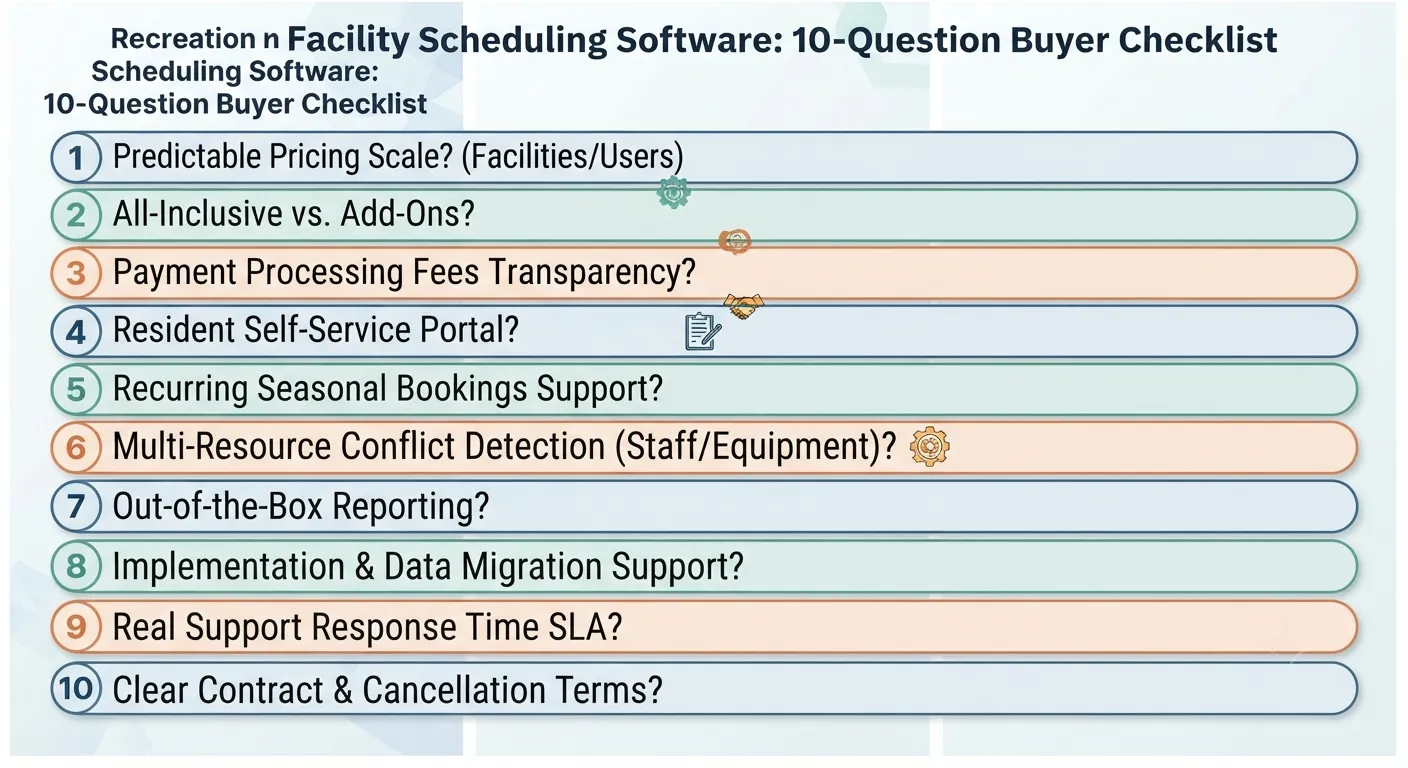
A 10-Question Buyer Checklist
- Does pricing scale predictably as we add facilities or users?
- What is actually included in the base price versus billed as an add-on?
- How are payment processing fees structured, and do they change at volume?
- Can residents self-serve bookings and payments online?
- Does it handle recurring programs and seasonal registration spikes without manual re-entry?
- Can it detect conflicts across rooms, fields, equipment, and staff together?
- What reporting is available out of the box, without a custom request?
- What does implementation and data migration actually involve?
- What is the real support response time, not just the advertised SLA?
- What are the contract terms, and what does cancellation look like?
Red Flags in Pricing and Contracts
- Pricing that requires a sales call before any number is shared, with no public range at all.
- Payment processing fees that are not disclosed until after signing.
- Long contract terms with limited ability to exit if the software does not fit.
- Free plans that turn out to require a paid add-on for basic reporting or resident self-service.
Questions to Ask in a Demo
- Show us how a double-booking attempt is actually caught and prevented.
- Show us how a recurring seasonal program (like a 12-week league) is set up.
- Show us the resident-facing booking experience, not just the admin side.
- Show us a utilization report live, not a pre-built sample.
Implementation Roadmap
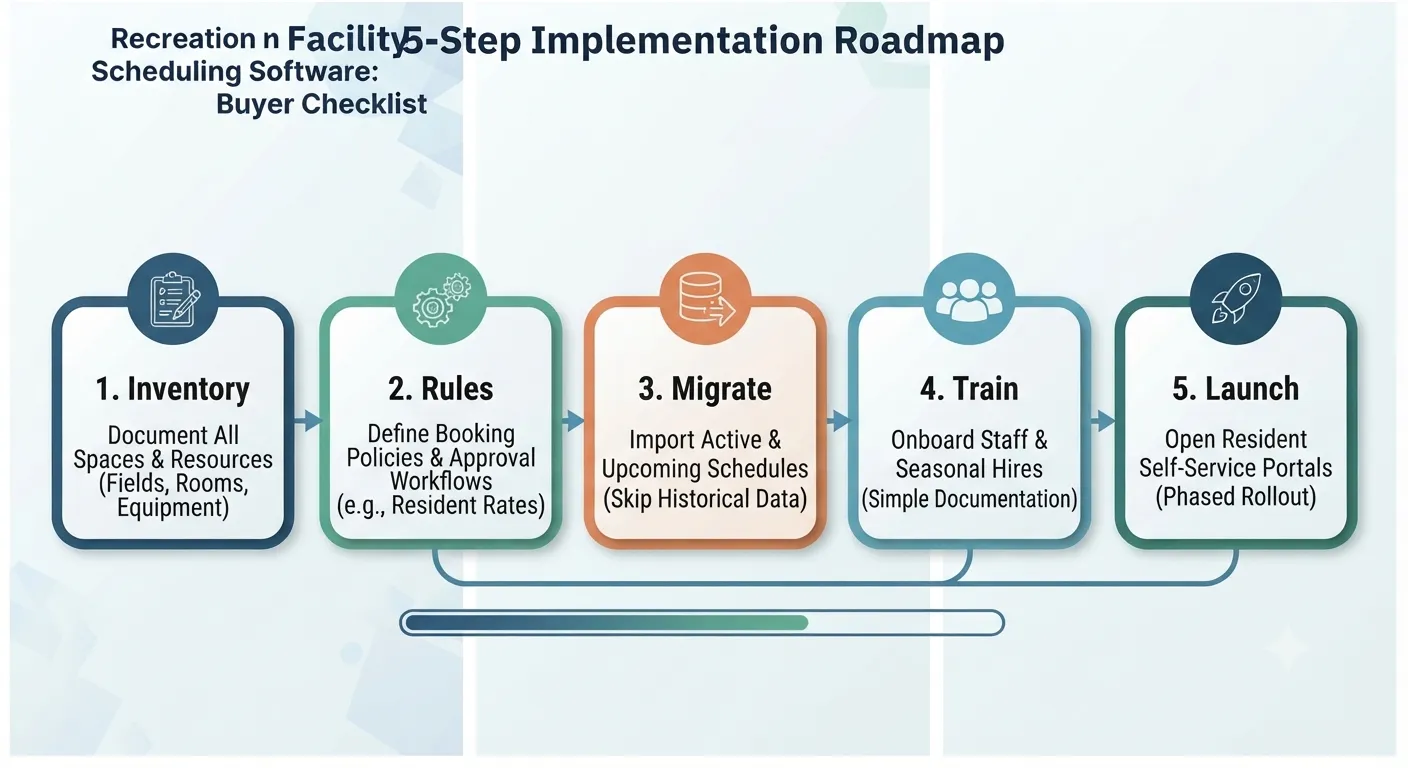
- Inventory every space: rooms, fields, courts, pavilions, and the resources tied to each.
- Define booking rules and approval workflows before configuring the software.
- Import existing schedules, focusing on active and upcoming bookings rather than historical data.
- Train staff, including part-time and seasonal employees who will use the system daily.
- Launch resident self-service once internal workflows are running smoothly, rather than all at once.
Common Challenges and How to Avoid Them
Challenge: Seasonal staff turnover makes consistent system use hard to maintain. Avoid it by keeping training simple and documented, so onboarding a new seasonal hire does not require a full retraining session each time.
Challenge: Resident self-service gets rolled out before internal processes are solid. Avoid it by stabilizing your own booking and approval rules internally first, then opening self-service once staff trust the system.
Challenge: Reporting still requires manual work even after switching software. Avoid it by confirming before purchase exactly what reports are built in versus what requires a custom request or upgrade.
Challenge: Hidden fees erode the affordable pricing that attracted you in the first place. Avoid it by getting a full cost breakdown, payment processing, implementation, add-ons, and contract terms, in writing before signing.
Best Practices
- Ask for the full cost breakdown up front, not just the advertised starting price.
- Pilot with one facility or department before rolling out district-wide.
- Document your approval and pricing rules (resident versus non-resident rates, deposit policies) before configuring the software.
- Review utilization reports quarterly to catch under- or over-booked spaces early.
- Keep training materials simple given regular seasonal staff turnover.
Future Trends in Recreation Facility Scheduling
- Resident self-service is becoming the expectation, not a bonus feature: residents increasingly expect to book and pay online the way they would for any other service.
- Utilization reporting is moving from year-end summary to ongoing operational tool, helping departments make real-time decisions about staffing and program offerings.
- Budget transparency is becoming a procurement requirement, not just a nice-to-have, as public agencies work within tighter operating budgets.
- Integration with payment, permit, and waiver systems is consolidating into single platforms rather than requiring separate tools stitched together.
Why VenueArc Fits Transparent, Affordable Facility Scheduling
VenueArc’s booking platform is built around what recreation facilities actually need day to day: real-time availability across every space, automatic conflict prevention, recurring bookings for seasonal programs, resource scheduling for equipment and staff, and configurable approval workflows, all with straightforward, procurement-friendly documentation.
VenueArc is not the deepest fit for every corner of parks-and-recreation operations (asset and maintenance management plus GIS-heavy workflows are outside its core focus), but for departments whose main pain point is facility scheduling, conflict prevention, and resident-facing booking, it is worth a look.
Conclusion
Recreation facility scheduling does not have to mean choosing between cheap and limited or powerful and expensive. The real differentiator is transparency: knowing the full cost of ownership, understanding exactly what is included, and choosing a system built around the features that actually matter for multi-facility, resident-facing operations: real-time availability, conflict prevention, recurring bookings, and reporting you can act on.
If your current process is a mix of spreadsheets, shared calendars, and manual confirmations, the clearest next step is mapping out your facility inventory and booking rules before you compare vendors.
See how VenueArc handles multi-facility scheduling: explore VenueArc’s booking and calendar platform or request a demo.
Frequently Asked Questions
What is recreation facility scheduling software?
It is software that helps recreation centers, park districts, and community organizations manage booking, availability, and conflict-free scheduling of shared spaces like gyms, fields, courts, and community rooms, along with the equipment and staff needed to run programs in them.
The category exists because recreation operations are rarely about one room. A department may run several buildings, outdoor fields, and a rotating calendar of leagues, camps, and rentals at the same time. A shared calendar can show what is already on the schedule, but it cannot check a new request against every space and resource at once, which is how double bookings and lost requests happen.
Practically, the software becomes the single record of what is reserved, who approved it, and what still needs to be confirmed, so staff are not reconstructing the schedule from email threads.
How is recreation facility scheduling software different from parks and recreation software?
Facility scheduling software focuses narrowly on booking and availability. Parks and recreation software is a broader category that can also include program registration, memberships, payments, and sometimes maintenance and asset management.
- Facility scheduling or booking software - availability, conflict checks, approvals, and reservations for spaces and resources.
- Recreation management software - registration, memberships, payments, and resident communication, often with scheduling as one module among several.
- Parks and recreation software - the widest umbrella, sometimes adding asset or maintenance management, GIS, and citizen engagement tools.
The distinction matters during procurement, because a broad suite priced around registration volume can cost more than a department needs when the actual pain point is conflict-free booking across a handful of facilities.
Can scheduling software prevent double bookings?
Yes. Purpose-built systems check real-time availability across rooms, fields, and resources simultaneously, which spreadsheets, shared calendars, and basic appointment tools generally cannot do reliably.
Conflicts happen in the first place because most manual setups track one dimension at a time. A calendar entry says the gym is taken, but it does not know that the portable staging, the scoreboard operator, or the staff member assigned to open the building is already committed elsewhere. A conflict check that looks at the space and its attached resources together is what closes that gap.
The practical payoff is fewer apology calls and fewer last-minute room swaps, which matters most during seasonal peaks when booking volume is highest.
Is Microsoft Bookings enough for a recreation facility?
Microsoft Bookings works well for simple appointment scheduling with Outlook and Teams integration, but it is not built for multi-facility conflict detection, recurring program scheduling at scale, or resident self-service with payments.
That is a fit question rather than a quality question. Appointment tools are designed around one person or one resource at a time, so they handle a fitness assessment or a facility tour well. A recreation department instead needs to know whether a 12-week league can hold the same field on the same evening all season without colliding with a camp, a tournament, or a maintenance window.
If your operation is a single room and a handful of appointments, a tool like Bookings may be enough. Once recurring programs and multi-space conflicts enter the picture, it generally is not.
What should transparent pricing include?
A clear breakdown of the base subscription, implementation fees, payment processing rates, facility and user limits, support tier, and contract terms, not just a headline starting price.
- Whether the base rate scales by facility count, user count, or transaction volume.
- One-time setup, configuration, and data migration costs.
- Per-transaction payment processing rates, which add up at high program volume.
- What triggers an upgrade, such as adding a facility or an admin seat.
- Contract length, cancellation terms, and renewal pricing.
Costs that surface after signing are not savings, they are deferred spending. Getting the full breakdown in writing before purchase is what makes an affordable quote hold up over a multi-year term.
How much does recreation facility scheduling software cost?
Publicly listed starting prices in this category range widely, from roughly $99 to $150 per month for some platforms to several thousand dollars per year for larger, usage-based plans. Total cost of ownership is a more useful comparison point than the starting number alone.
Starting prices move often and vary by facility count, feature tier, and contract terms, so the figure on a pricing page is best treated as the opening of a conversation rather than a quote. Two vendors can advertise similar monthly rates and still differ substantially once implementation, processing fees, and seat limits are included.
The practical approach is to price your own scenario - your facility count, your admin users, your expected transaction volume - and ask each vendor to quote against it.
What features should park districts prioritize?
Centralized visibility across multiple facilities, conflict detection across rooms, fields, and equipment, recurring program scheduling, and utilization reporting tend to matter most for multi-facility districts.
Those four sit at the center because they map to how a district actually fails. Without centralized visibility, each site keeps its own calendar and no one can answer a simple availability question. Without resource-level conflict checks, a field gets booked while the equipment or staff needed to run the program is not free. Without recurring scheduling, a full season of league dates has to be entered by hand.
Utilization reporting is the one that is easiest to defer and most useful later, since it shows which spaces are oversubscribed and which are quietly sitting empty.
Ready to see a transparent, straightforward approach to facility scheduling? Explore VenueArc’s booking platform or request a demo.
Want technology done right?
Get a free assessment from an Inc. 5000 Microsoft Solutions Partner.
Get Free Assessment ->